Showing posts with label Trello. Show all posts

Saturday, January 21, 2017

I Connected Cousins to Orphan Photos

I'm so very blessed to have a second cousin who shares many of my interests, among which are family history, webinars, and cool apps like Trello! Kate Keller is guardian over many "orphaned" photos and created a Trello board where she posts those pictures for possible identification by others. 

On a Trello list for the Heart of Ohio Antique Center in Springfield, OH, Kate listed this photo for Herman Maupin Doddridge. His full name was written on the back of the photo, as seen at the left edge on the second photo below. 


This is the studio where the photo was taken:


The name Maupin caught my attention, as my step-grandmother was Laura C. Maupin. I referred to my RootsMagic database to see if I could make a connection between Laura and Herman. After finding the ancestry of Herman on the Family Tree at Family Search, I was able to prepare this chart showing how they are connected as cousins:
Since I'm in touch with a granddaughter of Laura, I can also show her how she's connected to this Herman Maupin Doddridge.

Also available at that Antique store, and purchased by Kate, was this photo of Mary C. Stevens Doddridge.
Information on the Family Tree at FamilySearch.org tells me that Mary is the mother of Isaac Emory Doddridge and therefore is the grandmother of little Herman M. Doddridge. That information is also listed on her Find-A-Grave memorial that can be found at this link. 

I'm also in touch with another cousin of Herman M. Doddridge, through my adopted son's family line! You can see in the chart below that Herman is a 4th cousin 3 times removed of Gwenda Kay Duff. And Gwenda is a 5th cousin of my son. 


I find it remarkable that one of my cousins (Kate) from my mother's family line owns an "orphaned photo" of a child who is a cousin of one of my "step-cousins (Cheryl)" (obviously through my step-mother's family line) and a cousin of one of my son's cousins (Gwenda)! 

In my notes of last Fall's research, I see that Herman is also a cousin of my sister-in-law (Linda), but I can't find the notes that show that relationship. I'll keep looking.

I love these kinds of discoveries. I love knowing of these connections. And I love finding family members of orphaned photos!

Sunday, May 29, 2016

I brought hidden emails to light, a light that shines on new connections

I spent considerable time the past two days "resurrecting" emails that I've saved since 2009, which had all been labeled "Genea-Diary" in my Gmail program. I'd accumulated 237 emails on the topic of family history and filed them in folders according to surname. The information they contained had long since been added to my genealogy database, but I kept the actual emails to help keep track of "who" I got "what" information from. In most cases I hadn't taken time yet to add those details to my database, or some other record-keeping system. 

Since my friend and fellow genealogist Lisa Alzo introduced me to Trello, a handy web-based organizational tool, I've had fun organizing some of my family history documents, photos, families, etc. I've written blog posts about that here and here.

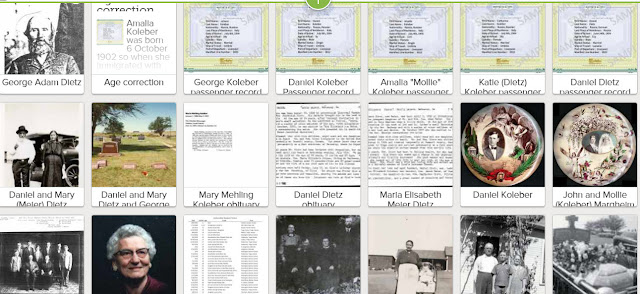
I've either become a "Trello Addict", as my cousin says, or a "Trello Monster", as Lisa says, because when I start my day, I find myself thinking of more ways to use the Trello board organizing system in my genealogy. Friday morning I thought of retrieving my large volume of saved emails and putting them on a Trello board where I can easily see what I have, and with two clicks, be able to read the messages. It took me two full days, but I got the job done! You can see a screenshot of the resulting "Genea-Diary" board at the top of this post.  

The final bunch of emails that I added to the board last night were from a gentleman named Jay Barney, in Oct. 2014, in response to a blog post I'd written. I wrote a series of blog posts on 'Grace and Glory Plus' on my website that featured my house history and the residents who lived in my house 1910-1940. 
In 1920 the James Norton Seip family lived in my house. Here's the story I wrote about that family. 
Since I posted the story on my website, I got an email when Jay Barney posted his comment to my story. I'm sharing that here.
My story was seen by Jay, the great grandson of James N. Seip, and by his cousin Doug Seip. The story also facilitated a connection between Jay and Doug, as you can read in the comments. So let me add that it's good to get the word out through blog posts, as they truly do bring families together!

Last night, as I was finishing my 2-day project of moving saved emails to my Trello board from the "hidden depths" of archived emails, I showed my husband all the emails I'd received from Jay Barney and the related story on my blog about the Seip family residing in our house nearly 100 years ago. I noticed again that Jay had commented that his great grandfather had served in the Civil War. Larry asked me to show that to our son Matt Jamison because he's a Civil War re-enactor. So we went to bed thinking of James and his Civil War service. 

Here's where the story gets interesting. 

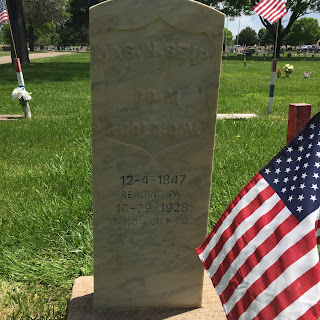
This morning we drove through the cemetery on our way home from church. We drive right past it, so often take a quick detour as we're coming home. As Larry was meandering around the narrow roads, I noticed a headstone for a "Hardin" family. My step-mother's grandmother was a Hardin, so I asked Larry to stop and let me make a note of the details on that headstone. It's happened more than once that I've discovered a relative's burial here in Lakeside Cemetery that way. I got out of Larry's parked pickup and walked west to view the Hardin headstone. I noticed, however, that no death dates were entered on the stone. Nothing for me to look up online. As I was walking back to the pickup, I proceeded to walk a little to the east, as there were military headstones decorated with flags for Memorial Day and it looked beautiful. I looked at the name on the first headstone near me and was stunned to see "Jas. N. Seip". I yelled, literally yelled to Larry that the stone belonged to James Norton Seip, whom we had just read about again last night while I was working on my Trello board! I took this picture of Larry standing by James's headstone so you can see how close it was to Larry's truck. 
Larry Jamison stands at the grave of James N. Seip
James N. Seip 4 Dec 1847-29 Oct 1928
Of course I had to get in the picture too!
I'm not able to visit the graves of my parents on Memorial Day since they're buried in Kansas, but I feel like I've been privileged to visit the grave of Civil War veteran James Seip on this Memorial Day weekend. It was noted in his obituary that he was known as "Dad" to this community of Canon City, CO. So I did get to visit "Dad" today! And I really feel like he came to us today. Maybe he came to us yesterday and led us back to him today. 


As I read the story of James on his Find-A-Grave memorial I learned that he "was credited with a larger personal acquaintanceship than the mayor." Perhaps he can add Larry & I now to his list of acquaintanceships! 

But wait, the story gets more interesting!

After we got home from church and our little tour through Lakeside Cemetery, I opened my email. I only had this ONE message since yesterday. 


   Recently the Famly Tree at FamilySearch has enabled their message program like the one that's been available on Ancestry.com for several years. I've sent 2 messages via this system, but haven't received answers. So this was my FIRST message from another Family Tree user. It's from "Jennie" asking me for more information about John Nolon and his wife Margaret Robison. You might ask "what's spectacular about that message"? Well, it happens that Margaret Robison was born in 1907, when her parents were the residents of my house. In fact, the house I'm living in is known as "The Wedding House" as it was built as a wedding present for David and Goldie Robison in 1902 by his father Lyman Robison. Margaret is their daughter! And I wrote about them in this blog post when I was writing about our house history.
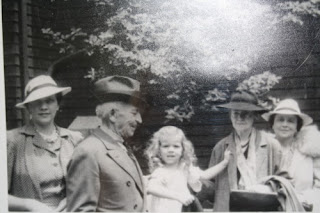
Margaret Robison is pictured at far left. 
I think I stirred something up when I resurrected some emails yesterday. Letters that had been tucked away and saved, out of sight and mind. When I brought them into the light, I must have awakened the subjects of some of those letters. Besides the letters from Jay Barney about the Seip family and subsequent discovery today of James's grave, I read emails that I'd exchanged with a Patrick Bauer of Florida about a Goodloe family who were early residents of Canon City. My correspondence with him was the result of my discovery of this photo at my office in the local Episcopal Church. 
This photo features Harriette Goodloe with Lyman Morey Robison at her right (second from left in the photo). Lyman is the brother of Margaret Robison, the subject of the inquiry I received today from "Jennie" from Family Tree! So Lyman was a resident of my house at the start of his life.

One more interesting detail: James Seip's wife was named Jennie. My inquiry today from Family Tree about Margaret Robison was from her granddaughter "Jennie". 

By resurrecting the saved emails about the Seip, Goodloe and Robison families, I opened the door to fresh connections the very next day to those families. That's more than coincidence. It's miraculous!

Friday, May 27, 2016

I took a deep breath and created my first video

Earlier this week my Facebook friend and genealogist Amy Johnson Crow posted information about a short video she created using a new tool from Adobe, called Adobe Spark. Here's a link to her video. 

I've been wanting to prepare a brief instructional video with Adobe Spark to demonstrate some of the Trello boards I've created for families in my ancestry. Eventually, I want to learn how to make a video that is a Screen Share with narration so I can actually take you through the process of creating a family Trello board. So far I haven't "gotten all my ducks in a row" to create that video. I'm learning these new techniques in tiny baby steps!

In the meantime, I followed the instructions of Amy Johnson Crow and created a very short video this week that is an introduction to how I use Trello in my family history research. I used the powerpoint presentation I created about a month ago that I store on SlideShare (my first effort in that area too). I added quick narration (they don't allow you much time!), and uploaded the resulting video to YouTube. I also shared it with the Trello for Genealogy and Family History group on Facebook. You can view it here. 

I've had such fun creating the family boards and I'm amazed at how much closer they're drawing me to my ancestors, as I study the news clippings, documents, and photos that I'm adding to the family on the Trello board. I encourage you to give consideration to doing the same. Step out and create something new. Trello is FREE, easy, web-based with a wonderful mobile app, versatile and lots of fun. It's a good collaboration tool since we can allow others to have access to our boards, or make them viewable to others, or we can keep them private. Give it a try! You'll have fun and create something that your descendants will be grateful to have. I sure wish this technology had been available 100 years ago and someone would have created a nice Trello board about my great-grandparents! 

Saturday, May 7, 2016

My husband's idea for a useful Trello board

My husband and I got into a really delightful conversation last night after he viewed the video on YouTube that shared my interview by Russ Worthington. Larry is a creative person who thinks outside the box. He thought of using Trello to set up a Board that could organize plans and necessary information for survivors when a death occurs or is imminent in a family. 

I created the simple template pictured above from his idea. For our personal board, I'm confident Larry will come up with a very unique title. But until then I simply call it the "Toward the Finish Line" board. The nice thing about Trello is the flexibility and ease of use! I made lists which can be moved into any order. The cards on each list can also very easily be moved, simply by dragging and dropping to where you want them. Appropriate photos can be added to the face of each card again with a simple drag and drop.

The first LIST at left on this board above is called "Vital Records". You can make a card for each document that will be needed for reference as a death approaches or occurs. I made cards for things like your will, insurance policies, monthly expenses and monthly income sources, etc. These cards can hold information for the things an Executor or responsible individual will need when settling your Estate. 

I made a LIST for Funeral and Burial information and plans. You can enter contact information for the Mortuary, Funeral Director, any pre-paid plans, and burial information you desire, so your descendants can easily handle these final plans. 

I think it's good to have a LIST that holds up-to-date contact information on your family members for ease in notifying them at this stressful time. You could make a CARD on that list with the information for each person/family or simply add the information to the back side of the card which opens when you click the card.

I made a card for Legal Information. This could be contact information for any attorney or legal counsel your family might need to contact.    

Now here come the "Peacemaker" LISTS. In our family we have 7 children, but I only created 2 lists (identical in this template) for the purpose of listing the possible things each child would like to inherit. And it's so easy to add a photo of each item. If this is determined while everyone's healthy and happy, it can save much grief when emotions run high at the time of the passing of a family member. Larry and I are going to make a list for each of our children, decide on and clarify the items they will inherit and post those things on cards on their personal list. The nice thing is that each card can be moved to someone else's list, if all agree. 

I've made this template board PUBLIC. Here's the link to access it. It's just a start and simply my idea. If you want to take a closer look and consider using it for your personal use, get your account at Trello.com and get busy. If you have comments or questions, my email is available here on the front of my blog. Let me hear from ya!

Cousin Russ helps me share a new idea for Genealogy Collaboration

Cousin Russ Worthington
Cousin Russ (Worthington) hosts a Genealogy Community on Google+ and is quite a creative and generous family history resource! He assists DearMYRT with her frequent Google+ Hangouts on Air, he serves as the "official Go-To Guy" for Family Tree Maker, is a teacher and presenter of family history lessons to the genealogy community, is quite "tech-savvy", and produces many training videos and tutorials on his own YouTube channel. And best of all, he's a very nice man, loyal supporter and trusted friend. 

In a recent conversation with Russ, I mentioned how excited I was to discover Trello after Lisa Alzo introduced me to it a few months ago. I've been thinking of ways I could use this wonderful tool in my family history research. Russ demonstrated how he and DearMYRT have been using it for quite some time with their Hangouts on Air. Our interest lies in making collaboration between cousins, family members, and other interested people easier and more accessible.

I told Russ of an idea I was developing into Trello Boards and shared my initial attempt with him by adding him as a Member to my boards. With some refinement at his suggestion, I prepared a Family Board that represents my Margheim great-grandparents, the parents of my dad's dad. You can see a picture of the Jacob and Katie Margheim Family Board above.
The Trello and Family Collaboration video Russ
Worthington and I did. 
Russ has been eager to share this idea with the genealogy community so he organized a brief interview with me yesterday and opened a "Google Hangout on Air" to record the interview. When the recording was done, it was immediately uploaded to his YouTube channel and to his Community on Google+. 
My first Hangout on Air, breaking in my
new headset and learning a lot
in an interview with Russ Worthington.
Thank you for your patience, Russ!
I invite you to click here and watch the 15 minute interview. It may stimulate some ideas in your mind that can help you collaborate with your family on your family's history. You don't have to be a genealogist to share old family photos, stories, or treasures, and to appreciate the lives of those to whom you owe your heritage. And Trello is easy, flexible and fun!

After my husband Larry Jamison watched the interview last night, he came up with an excellent idea for another Trello board. Stay tuned for my next post with details about that. 

Saturday, April 30, 2016

My Family Trello Boards are Digital Scrapbooks

In my last blog post, I wrote about discovering Trello and creating a Board for the use of our Family History Center staff. I enjoy the product so much and am visualizing more ways to use a Trello board in my family history research.

This week I created 3 new Trello boards as I'm showing on the image above. In that pedigree, I'm the primary person, Mary Rebecca "Becky" Margheim. My father is Ernest Ludwig Margheim and his parents are John and Mollie Koleber Margheim. 

I created this Trello board for the John & Mollie Margheim Family.

Starting at the upper left corner you can see a List for John Ludwig Margheim. Beside it to the right is a List for my grandmother Amalia "Mollie" Koleber Margheim. The third List is for my dad, Ernest Ludwig Margheim, then comes Alfred George Margheim, LaVerna Margola Margheim and Leonard Marvin Margheim. The items that I've included for each person show a snapshot into their lives. I've created a "Card" for each person that contains their birth information, documents, photos, news clippings, greeting cards, etc. I've also added "cards" for Marriage, School, Hobbies, Careers, Death, Funeral, Burial and life events like that. 

The nice thing about using a Trello Board for organizing and displaying these kinds of things about family members is the flexibility and variety of information we can add. The Cards move from List to List simply by dragging them into place. In the family above, LaVerna and Leonard are twins, so I could add birth information and photos for LaVerna and simply copy it to Leonard's List. On John and Mollie's Lists, I could share marriage documents and photos. 

You can see in the above pedigree that George and Katy Koleber were the parents of my dad's mother Mollie. I prepared a Trello Board for them initially to organize and make easily available a very large collection of newspaper clippings that I've gathered from the Barton County Democrat and Western Kansas World, found at Chronicling America, a Library of Congress site. 

Since George and Katy Koleber immigrated to America in 1904, I also included Immigration records on their Board. I added the news clippings in chronological order on each person's List. By reading the family Board, I've gotten a much better picture of their daily lives, the ups and downs, challenges, losses, and trials. I found many news articles online about George Sr. and George Jr. and know how much time they spent together working and visiting, just by reading the short news snippets.

As I researched for news clippings for my grandpa Margheim's family, my heart was drawn closer because of all the trials his family went through. 

This is the Board I made for Grandpa's parents and family, the Jacob and Katy (Winter) Margheim Family. Their first child was daughter Eva, who married Fred Michaelis. I've added the news clipping that tells of their 4 year old son's accidental death. Next to Eva is daughter Lena, who passed away in the Topeka (KS) State Hospital. Her death certificate is a "Card" on the List. Jacob and Katy's oldest son Fred is shown in the 4th List from the left. His death by drowning in a local lake is recalled in a news clipping that is also included in his personal List. And the stories continue as we review the lives of the members of Jacob and Katy's family. 

Presenting information in this format has been enlightening for me, not to mention how much fun I've had creating the Boards. I have a lot of news clippings from the early 1900s that mention my mother's parents and grandparents, so I'm planning to create Flanders and Becker Boards yet. 

I can add photos, documents, and news clippings to the Memories gallery on my Family Tree at FamilySearch.org, and have done so.

But the flexibility of adding so much more information, comments, links, and labels to the Cards on a Family Trello board make it very appealing to me for organizing and sharing my family's history. 


If I have many photos for an individual or family, I've uploaded them to albums on Flickr and put a link to that album on the final Card for the individual on their List. 

I recently created a Power Point presentation for any of my cousins who would like to see the Trello Boards for our common ancestors. You can find it here.

If you would like to visit my Family Boards for ideas of how you can make a digital scrapbook for your family, or if you're my cousin and want to learn more about our family members, or download any of the resources I have on my Trello Boards, just open your FREE account at Trello.com and email me your Trello account name so I can give you access to my Boards.
My email is maryrthompson218@gmail.com.
I think you'll have fun with it. Let me know!

Friday, April 15, 2016

I'm learning PowerPoint and Trello simply by DOING

Jones Laundry, Great Bend, KS 1957
I learned how to do the tasks needed in my first job from my mother because she managed her father's Laundry business where I worked part-time through high school. After I was married, I quit my school teaching career and became the Bookkeeper for my husband's Electrical Contracting business. It was my father who taught me the accounting I needed to know to do that job. But I've had to teach myself at every job I've had for the last 30 years. It's been good experience. So many of us work on our computers alone. We aren't part of a Team or in a class setting. Technology changes quickly and if we want to keep up, we must explore new things by ourselves. Printed manuals seem to be a thing of the past. They've been replaced by training videos, webinars, social media groups, and blog posts, etc.
I enjoy watching genealogy webinars because they're mostly presented by experienced masters in their field. They know their subject well and present it so we can understand their message. So when a genealogy presenter offers a webinar on a technology topic, I go for it. 

Lisa Alzo
Lisa Alzo is one such presenter. She and Thomas MacEntee from 'Hack Genealogy' frequently offer "Boot Camps", as they did last year about the writer's tool Scrivener. I found Scrivener to be more complex than I needed for my occasional blog post writing, so Lisa recommended that I check out Trello, which is simply a visual list tool. The lists can help us organize projects, regardless of what they are.
Lisa Alzo came to my rescue again last month when she and Thomas offered a Trello Boot Camp! How lucky can a person get? Before the Boot Camp webinar, I watched You Tube videos on Trello, joined the Trello for Genealogy and Family History group that Lisa set up on Facebook and created my first Trello board while preparing to attend the RootsTech 2016 Conference in Salt Lake City in February. It helped me get such things as travel arrangements, lodging reservations, conference registration, class schedule and syllabus materials organized and easily visible where I could refer to them. My packing list was right in front of me on my computer screen, instead of on a piece of paper that I kept losing. 

My second cousin Kate Keller is also a genealogist who welcomes learning about tools that are helpful in our research. I told her about Trello, she opened an account and created boards for each of the ancestral families that we have in common, and has shared those Boards with me. So I have access to much of her research about our common ancestors. 

As a result of watching Lisa as she presented the most recent Trello webinar, I got more ideas for practical uses for Trello boards. I serve as a Consultant, or staff member of our local Family History Center and help train the staff.  We all have so much to learn since techniques and tools change so quickly. Web sites change, active workable links come and go, content moves around and it's often hard to find what we're looking for, or "return" to what we're looking for. This seems to be my experience with the resources provided by the LDS Church to our staff. Videos, Powerpoints, talks by the professionals, interviews, workshops, manuals, lessons, and blog posts are moved around as content is updated. I get impatient when I have to keep clicking to find what I'm looking for. 

Since I wanted to try out Trello for something other than travel plans, I decided to make a Board that our Family History Center staff could refer to that would help them quickly find the plentiful resources that are available to us. I worked a couple evenings to set up the appropriate Lists, adding attachments and comments. Then I learned how to add photos to the card covers, so I spent another evening adding photos to each card that I'd established. 

I've been waiting for the Director of our Center to schedule a Training Meeting so I could show the staff what I've prepared. But this month's activity is a social event, rather than a training meeting, so my plan of sharing Trello with our staff was put on the back burner. 

I rarely have a free day at my job, but found myself idle yesterday for a few hours. I thought of using another app that I like called Snag-It to prepare a quick video to show the staff how to use our Consultant Board. But I haven't done that before and am much too self-conscious to prepare a video to share with others! Again, I'll have to learn how to do that on my own, but am just not ready yet. 

Last year I was asked to give a presentation at a local Discovery Day, following the RootsTech conference. That was my first attempt at preparing a Power Point presentation. I had the software so I waded through it and got the job done. 

Therefore yesterday I boldly decided to prepare a Power Point presentation that I could make available to our Center staff that would illustrate what Trello is, how to read it, and what it would offer them. I still look forward to doing a personal presentation to stir up some excitement, enthusiasm, and energy. But my PowerPoint may serve to acquaint the staff sufficiently that Trello won't be a foreign word to them as they attend that meeting. I uploaded the presentation to SlideShare so the staff can view it at home. 

I'm not a Presenter. I'm not a Public Speaker. I don't even know how to hook up my laptop to a projector! And I don't really want to know. Fortunately I have a friend who knows those things. So I hope next month I can show our Center staff what new tool I've created for them.     
Take a peek at the Lists I added to the Consultant Board.
 I cover such topics as 
1. How to Use Trello
2. Self Training
3. Leaders Talks
4. Lessons
5. Blogs
6. Videos
7. Facebook
8. Guides and Handbooks
9. Power Points
10. Partners
11. Discovery Activities
12. Training Meeting Schedule
13. Roster of our Staff

Each List has numerous cards itemizing resources on that topic. When we click on a Card (each white rectangle in the List), we are taken to what I call the "Back Side" of the card, with information on that subject, such as attachments, links, comments, checklists, color-coded labels, etc. As we can see, photos can be inserted into each "Card" to illustrate that topic for easy reference. 
I've taken the step to learn about Trello and have ventured into the realm of Power Point presentations (even though I've heard from so many people who have nothing good to say about them). I feel like I'm way behind the times, but I'm learning and I'm DOING! And I'm sharing what I'm learning, hopefully for the benefit of those with whom I serve in our Family History Center and a few friends along the way. And I'm having fun!

Saturday, March 19, 2016

I Went to Boot Camp, Trello Style

This morning Thomas MacEntee and Lisa Alzo 
presented a class about using the web site Trello that they called "Getting Started with Trello Mini Boot Camp". I eagerly attended the online class as I know from experience that they deliver excellent lessons that are well worth watching. This class was hosted by Thomas and presented by Lisa. 

 As soon as the class was over I got an idea for an application of all I had learned. I serve as a Consultant in our local Family History Center and help with Training of the staff. A tremendous amount of resources are available to us from the wonderful folks at FamilySearch, but it's scattered across many web sites. It's challenging for new staff members to find what they need. 

I created a Trello board for the Consultants that will be a centralized place for them to find access to training materials. I can share the Board with anyone, so I'll be inviting the other Consultants and Directors of our local and regional Family History Centers to have access to this Board.
I've created cards for such things as Blogs, Videos, Lessons, Training, staff roster, etc. Each card has information "inside" that contains such things as attachments, photos, links, email address, comments, checklists. And each "Card" has several lists on it ....as many as we want. The lists and the cards can all be moved around. I've added color-coding via "Labels", as you see the green, blue, orange bars, etc. 

A few weeks ago when I opened my Trello account, I told my second cousin Kate Keller about it. She immediately started using it to create Boards for her ancestral families and is sharing those Boards with the family names we have in common. We're able to choose the color of the Board background, so she has chosen green for the families we have in common. She's created cards with such headings as To Do, Researching, Documents, Photos, Items Needed, Contacts, etc. We can each contribute to the cards, modify them, and basically manage them. It's a good way to work together on our family history research. 

The first board I set up when I opened my account last January was for planning purposes for our trip to RootsTech, the genealogy conference we attended in Salt Lake City in February. I made cards with lists for Registration, Packing, Flights, Schedules, Syllabus, People to See, etc. It was quite handy and actually well used. Trello is available for smartphones and tablets, so I had everything with me. 

While starting my free Saturday off in "Boot Camp", I'm happy to tell you I've had a really fun and interesting adventure with Thomas, Lisa and my new Board creation. I can't wait to invite my fellow Consultants and Directors to share my new resource. This might be a good subject to offer at our April training meeting.